An aluminum PCB is a printed circuit board that combines copper circuitry, an electrically insulating thermal dielectric and an aluminum base. The dielectric carries heat toward the metal while separating the circuit electrically. This construction is useful for LED lighting and power electronics when the board, mounting interface and cooling surface form a suitable heat path.
Choosing the board means checking that complete path. A higher dielectric conductivity may help, but its effect depends on thickness, heat-transfer area and the resistance elsewhere in the assembly.
Key Takeaways
- A standard aluminum-backed board uses a dielectric to transfer heat while electrically isolating the copper from its metal base.
- Compare dielectric thickness and thermal resistance alongside conductivity. A conductivity figure alone cannot predict component temperature.
- In the illustrative example below, improving the heatsink lowers calculated junction temperature more than doubling dielectric conductivity.
- Specify electrical isolation, hole construction and the mounting interface before releasing fabrication files.
What Is an Aluminum PCB?
An aluminum-core PCB belongs to the broader family of metal-core PCBs, also called insulated metal substrates (IMS). Aluminum is the supporting metal in this construction; the etched copper carries the circuit. The spelling aluminium PCB describes the same board family.
The common single-sided version places components and copper routing above an insulating dielectric bonded to the metal base. TCLAD’s insulated metal substrate information describes this circuit, dielectric and metal-base combination.
An aluminum LED PCB can connect the LED thermal pads to a larger cooling surface through that stack. Power-conversion designs can use the same principle, provided their routing and isolation requirements fit the construction. Metal backing does not remove the need to check component temperatures, electrical clearances or cooling conditions.
Stackup: Copper, Dielectric and Aluminum Base
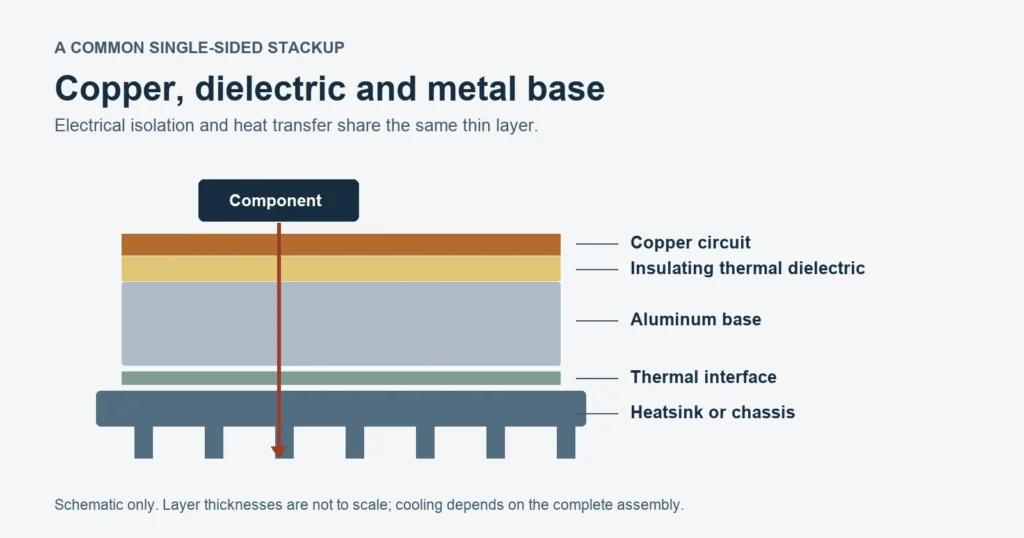
What each layer does
Each layer performs a different job. Copper provides electrical connections and local heat spreading. The dielectric provides electrical separation while conducting heat through its thickness. The aluminum base supports the board and spreads heat toward the mounting surface.
| Layer | Main function | Selection question |
|---|---|---|
| Copper circuit | Carries current and distributes heat locally | Does copper geometry meet electrical and thermal needs? |
| Thermal dielectric | Insulates the circuit from the base and transfers heat | Are thickness, thermal resistance and isolation appropriate together? |
| Aluminum base | Provides support and heat spreading | Does the base fit the mechanical and cooling interface? |
Single-sided and more complex constructions
A second circuit layer or a hybrid build changes how electrical connections pass through or around the conductive base. Insulated interconnections require a defined construction. Confirm that construction before treating a multilayer aluminum board like an FR4 board with a metal backing.
Direct thermal path designs are a separate option: selected component pads can have a different connection to the metal. They require a review of pad potential and isolation. Standard dielectric-backed assumptions cannot simply be transferred to them.
Thermal Conductivity Is Only One Part of the Heat Path
The useful thermal question is how far the component temperature rises at the expected heat load. Conductivity describes a material. Thermal resistance describes a particular geometry or assembly and is expressed in K/W, equivalent to °C/W for a temperature difference.
Calculate dielectric resistance with thickness and area
For steady, one-dimensional conduction through a uniform layer, the thermal resistance relation explained by MIT is:
Rθ = t / (k × A)
Here, t is thickness in meters, k is conductivity in W/(m·K), and A is the assumed effective heat-transfer area in square meters. Effective area is not automatically the entire board area.
Consider a hypothetical dielectric with:
- Thickness: 100 µm = 0.0001 m.
- Conductivity: 1.5 W/(m·K).
- Effective area: 100 mm² = 0.0001 m².
Its ideal through-thickness resistance is 0.667 K/W. Doubling conductivity to 3.0 W/(m·K), with thickness and area fixed, gives 0.333 K/W. Doubling both thickness and conductivity gives the original 0.667 K/W.
These are teaching inputs, not stocked materials or electrically interchangeable options. Supplier resistance figures may also be area-normalized. TCLAD’s dielectric material table lists HT at 2.2 W/(m·K), with resistance of 0.05 °C·in²/W at 75 µm and 0.077 °C·in²/W at 100 µm. Those units are not K/W for a finished board. The table does not state its measurement method or establish that its resistance values follow the ideal slab calculation. Obtain the current grade datasheet and compare like test conditions.
Work through a junction-to-ambient budget
Assume one dominant series path carries 5 W of dissipated heat to air at 40°C. The following resistances are hypothetical effective terms chosen for this example, rather than measured or datasheet-derived values.
| Part of the assumed heat path | Thermal resistance |
|---|---|
| Junction to component thermal pad | 1.000 K/W |
| Solder and local copper spreading | 0.400 K/W |
| Dielectric, calculated above | 0.667 K/W |
| Aluminum-base contribution and interface to heatsink | 0.300 K/W |
| Heatsink to ambient | 4.000 K/W |
| Total | 6.367 K/W |
For this simplified network, Tj = Ta + Pheat × Rtotal. The calculated junction temperature is 40 + 5 × 6.367 ≈ 71.8°C.
Compare two design changes
Change one input at a time while holding the others fixed:
| Scenario | Total resistance | Calculated junction temperature | Reduction from baseline |
|---|---|---|---|
| Baseline | 6.367 K/W | 71.8°C | Reference |
| Double dielectric conductivity | 6.033 K/W | 70.2°C | 1.7°C |
| Reduce heatsink-to-ambient resistance from 4 to 2 K/W | 4.367 K/W | 61.8°C | 10.0°C |
The heatsink dominates this assumed budget, so improving it has the larger effect. A different assembly can produce a different result. Values are calculated with unrounded inputs and displayed rounded.
This model does not establish an acceptable operating temperature. Real spreading, parallel heat paths, airflow and temperature-dependent properties require analysis or measurement. Use heat loss rather than automatically treating all LED electrical input as heat.
Texas Instruments’ Semiconductor and IC Package Thermal Metrics (revised March 2024) explains why datasheet thermal metrics depend on their test conditions and heat paths. Do not treat θJA or an arbitrary θJC as a package-only resistor to add to a board/heatsink network. The example’s junction-to-pad term is expressly assumed. Use a model appropriate to the actual heat-extraction surface, without double-counting paths.
Confirm the complete design against component ratings and realistic prototype measurements; the PCB thermal hotspot guide covers that validation step.
Aluminum PCB vs FR4, Copper-Base and Ceramic Options
Choose the substrate around routing, electrical isolation, cooling and mechanical constraints together. A material with higher bulk conductivity does not automatically produce a cooler finished assembly.
| Option | Consider it when | Check before choosing |
|---|---|---|
| Aluminum-backed IMS | Heat sources can use a short dielectric path into a mounting surface | Dielectric resistance, isolation, routing freedom and heatsink contact |
| FR4 | Routing density or conventional multilayer construction matters | Whether copper spreading, thermal vias and the cooling assembly meet temperature limits |
| Copper-base construction | The application may benefit from a different metal heat-spreading path | Added mass, construction, electrical isolation and manufacturing cost |
| Ceramic substrate | Material-specific thermal, electrical or operating requirements justify evaluation | Ceramic grade, metallization, attachment process and mechanical loads |
Heavy copper describes thick copper circuitry; it does not necessarily mean the board has a copper base. Similarly, an aluminum board can carry signals, but its stackup still needs to satisfy routing and electrical requirements. Metal backing is not a substitute for a suitable reference structure in an impedance-sensitive design.
The PCB material selection guide compares the wider substrate choices. For an aluminum PCB vs FR4 decision, start by asking whether both can meet the same temperature, isolation and routing requirements within the available enclosure. Compare complete solutions rather than bare material labels.
Design Checks: Isolation, Holes and Mounting
Plan electrical isolation and mechanical contact together. A conductive base, screw or exposed edge can create a connection that the schematic did not intend.
Separate electrical connections from metal-core contact
Distinguish electrical plated holes and vias from mechanical mounting holes on the fabrication drawing. An electrical interconnect passing through a metal base needs the intended isolation construction. A mounting hole may intentionally connect the base to chassis, or may need insulating hardware; state which applies.
The aluminum manufacturing service lists insulated plated holes and through-hole assembly, with materials and stackup subject to engineering review. Confirm how lead barrels, pads and the base remain separated where required. Ask the fabricator to identify the insulation geometry and inspection method rather than assuming a standard FR4 drill file fully describes the feature.
Specify the board-to-heatsink interface
Define the contact area, surface flatness, thermal interface material (TIM), thickness and mounting method. Agree fastener torque with the assembly and hardware suppliers. Contact pressure, gaps and the interface material affect the real thermal path.
Ask the design reviewer to confirm how required insulation is maintained at screws, washers, slots and board edges. If the product needs a safety insulation barrier, document the applicable requirements and agree the insulation system and acceptance evidence.
Confirm electrical and manufacturing constraints
State working voltage, the required isolation function, creepage, clearance and acceptance tests. Ask for the approved operating-voltage specification as well as any breakdown or withstand-test results; do not infer the operating specification from a test number. Agree the correct limits for the application, construction and applicable product requirements.
TCLAD’s fabrication guidance treats circuit-to-hole clearance and HiPot testing as separate topics. Its numerical fabrication guidance is supplier-specific. Obtain the selected fabricator’s approved geometry and test criteria for the actual build.
Record outline, hole and copper-to-edge requirements for supplier review. Use the PCB DFM checklist for the broader release package, then add the metal-base details above. Avoid universal clearance or test-voltage rules detached from the intended product.
Manufacturing, Assembly and Cost Drivers
Bare-board fabrication and populated-board assembly need separate process decisions. Fabrication establishes the laminate construction, copper pattern, holes, outline, mask and finish. Assembly adds solder, components, thermal profiling and inspection.
Validate the reflow profile for the actual board and component set. Analog Devices’ assembly guidance for uSLIC packages recommends thermocouples at actual solder joints and explains that joint temperatures differ from oven settings. That guidance is package-specific, rather than an aluminum-board recipe. Apply the measurement principle while following the selected components’ and solder paste’s process limits.
Cost depends on dielectric grade and thickness, copper, outline, insulated holes, panel use, quantities, finish, inspection and assembly scope. Published minimum and maximum values do not establish that every combination is available.
Check LED and aluminum PCB capabilities as a starting point, then request confirmation for the selected aluminum construction. That combined capability page also covers FR4 products; its full range should not be read as a single aluminum stackup specification.
Turn the Thermal Design into a Fabrication Handoff
Carry the assumptions behind the thermal calculation into the release record. The worked example’s effective area, package term and interface resistance still need evidence before they can describe a real product.
| Record type | Include in the handoff | Status in this example |
|---|---|---|
| Operating requirements | Dissipated heat, ambient range, allowed junction temperature and operating modes | 5 W and 40°C assumed; acceptable temperature not established |
| Material request | Actual dielectric grade, thickness/tolerance, thermal test method, copper and base construction | Generic dielectric inputs only |
| Derived estimate | Calculation, assumed area, network boundaries and limitations | 0.667 K/W dielectric; 71.8°C baseline |
| Mechanical interface | Heatsink/contact drawing, TIM, mounting method and agreed torque | Interface and sink terms assumed |
| Electrical acceptance | Working voltage, isolation requirements and agreed test method/criteria | Requires application-specific definition |
| Manufacturing package | Circuit files, drills, fabrication drawing, outline, hole details, quantity and finish | Must be supplied for the actual design |
Provide Gerber or accepted ODB++ data with the relevant drill and fabrication information. Assembly also needs the BOM and placement data. Make revision identifiers consistent across files.
Before release, agree which thermal inputs come from supplier data, simulation or prototype measurement. Confirm that electrical insulation, machining limits and selected materials are compatible in the same build. A temperature calculated from assumed resistances does not approve a fabrication stackup.
Frequently Asked Questions
Does an aluminum PCB need a heatsink?
It may need a separate heatsink, a chassis connection or another cooling surface. The aluminum base spreads heat, but the complete assembly must still transfer it to the surroundings. Determine the cooling requirement from dissipated power, ambient conditions and allowable component temperature, then verify the assembly under realistic operation.
Can an aluminum-core board use through-hole components?
Yes, where its construction supports the required holes and electrical isolation. The conductive base makes hole design important. Specify which barrels and pads are electrical connections, whether the base is connected to chassis, and where insulation is needed. Confirm those details with the fabricator before release.
Is a 3 W/m·K dielectric always better than a 1.5 W/m·K option?
No. At equal thickness and area, higher conductivity reduces ideal through-thickness resistance. A thicker dielectric can offset that improvement, and another part of the cooling path may dominate. Compare the required electrical insulation, actual thermal data and assembly conditions together rather than selecting from conductivity alone.
Is the aluminum base electrically isolated from the circuit?
In a standard dielectric-backed construction, the dielectric is intended to separate the copper circuit from the base. Isolation still depends on the selected material, geometry, holes and assembly. Direct thermal path variants can differ, so define the intended electrical connections and confirm the required tests for the actual build.
Prepare Your Aluminum PCB for Review
Submit the circuit files, fabrication drawing, heat load, operating conditions and mounting requirements with your aluminum PCB manufacturing enquiry. The review should confirm a compatible construction and identify which thermal assumptions still need validation before production.